What AI Really Delivers in Code and Agile: Lessons from 100 Tasks Across 15 Projects

This article distills the key insights from a Lightning Talk by Murad Akhter, Co-Founder of Tintash and CTO of onBeacon.ai.
Real world use of AI in software development shows that acceleration is meaningful but inconsistent. Tintash analyzed about 100 engineering tasks across 15 projects and found that AI excels in structured, low context work and declines sharply in complex or revision heavy tasks. Leaders who benefit most apply AI selectively rather than universally.
Strategic Insights
- AI performs extremely well on documentation, research, code conversion, and boilerplate.
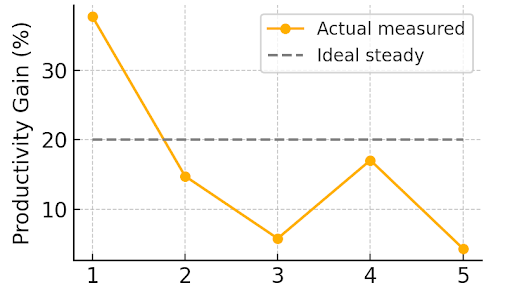
- Productivity varies by roughly 30 percent across sprints, which reduces planning reliability.
- Context heavy tasks reduce AI effectiveness and increase rework.
- QA becomes the bottleneck when testing cannot match accelerated coding.
- AI is an assistant, not an engineer. Senior oversight remains essential.
Where AI Consistently Performs Well
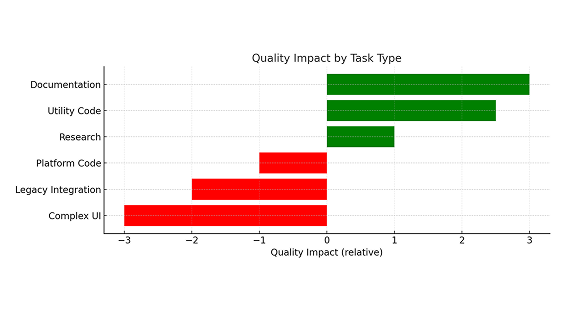
Tintash’s review shows that AI provides its strongest and most predictable benefits in low context, highly structured tasks. These tasks allow the model to work within clean boundaries and produce usable first drafts that require minimal revision.
High performing areas include:
- documentation and READMEs
- API and technical writing
- code conversion
- boilerplate
- simple prefabs
- early drafts and architectural exploration
- research and structured utilities
These tasks deliver reliable acceleration because dependencies are limited and quality expectations are clear.
Why Productivity Declines in Real Projects and Where AI Struggles Most
Why Productivity Declines in Real Projects
The same teams that saw strong gains in structured tasks also reported significant variability when work required deeper context. Teams observed:
- context window limitations
- sprint to sprint volatility
- tool instability and model degradation
- uneven access to premium tools
- AI driven scope expansion
This volatility made sprint planning difficult and reduced the reliability of the early productivity gains.
Why AI Struggles With Legacy Code and Complex UI Work
AI performs well on first drafts but breaks down as context increases. Legacy systems carry hidden dependencies and multi year structures that exceed the model’s reasoning capacity. Multi step UI flows behave similarly. As changes accumulate, accuracy declines and rework increases.
Areas where AI performs poorly include:
- legacy code
- complex logic
- multi step UI flows
- deeply intertwined systems
- hardware related QA
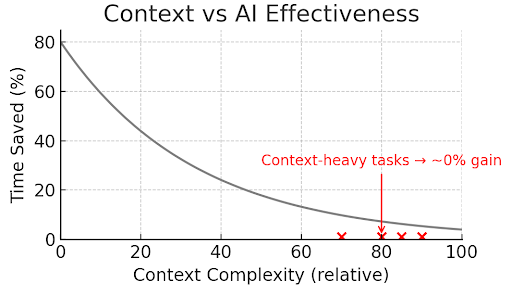
Even the best AI cannot currently ingest and reason about complex in-project context well enough to help. For example: Tournament matchmaking logic for one of our games projects – 3 days with AI vs 3 days manually.
Why QA Becomes the New Bottleneck
AI accelerates coding speed, but QA does not accelerate at the same rate. This mismatch creates bugs, rework, and late sprint delays. Testing becomes the gating factor because validation requires human review and context absorption.
The net effect: coding becomes faster, but delivery does not.
How Team Structure Influences AI Outcomes
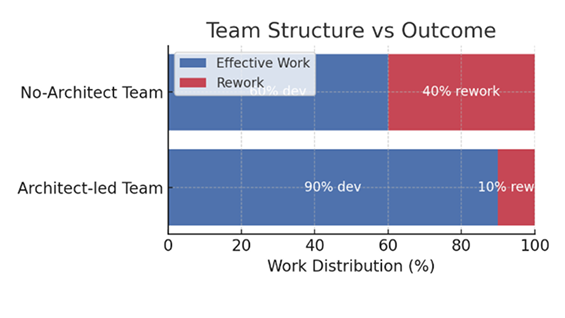
Murad’s review highlighted a consistent pattern. Teams with senior architectural oversight see fewer errors and more predictable gains. Senior engineers set guardrails, choose the right tasks for AI, and reduce rework by 10 to 40 percent.
Junior heavy teams experience more volatility. Tight deadlines increase rework because AI generated code is accepted without adequate review.
A Practical Framework for Leaders
The data suggests a simple, actionable approach for matching AI to the right work.
Use AI aggressively for:
- standalone modules
- boilerplate
- documentation
- utilities
- low context tasks
Use AI selectively for:
- UI drafts
- mid level features
- code review
Avoid AI for:
- legacy code
- complex logic
- multi step UI flows
- hardware QA
This selective approach stabilizes outcomes and reduces volatility.
Conclusion
AI offers real acceleration, but the acceleration is uneven. Teams that use AI selectively, add senior oversight, and strengthen QA can harness meaningful gains. Teams that expect uniform improvement across all tasks face inconsistent results and avoidable rework.
Watch Full Talk
What AI really delivers in Code & Agile